 Setpoint specification block
This control element sets a setpoint, for instance the temperature of the hot water or a flow temperature. The tile shows the current setpoint; in the dialog it is changed on the ring, with + and – or via a numeric keypad.
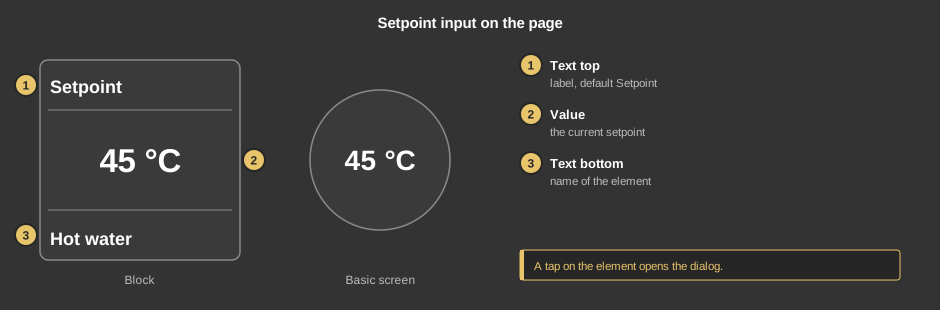
A tap on the element opens the dialog – on the tile as well as on the circle (basic screen).
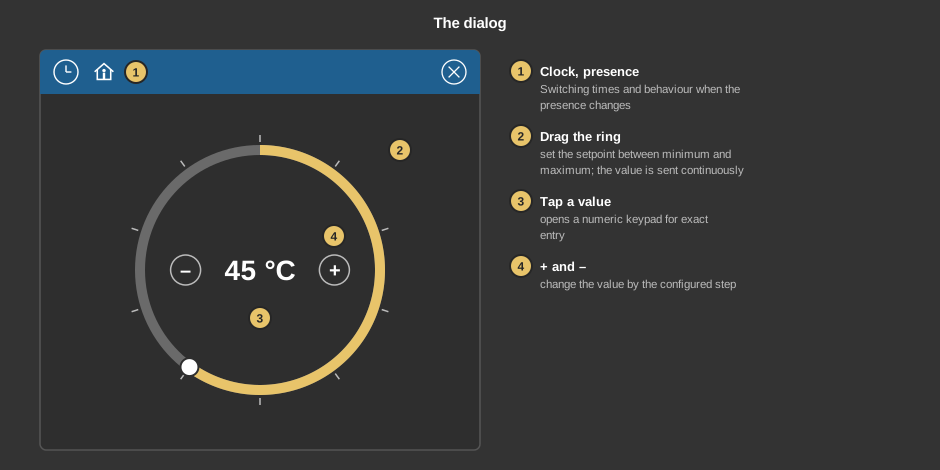
Every change is sent immediately; the dialog is closed with the cross.
Behind the clock are switching times that set a setpoint at a certain time – for instance a lower temperature at night. Everything else about them is described under Presence.
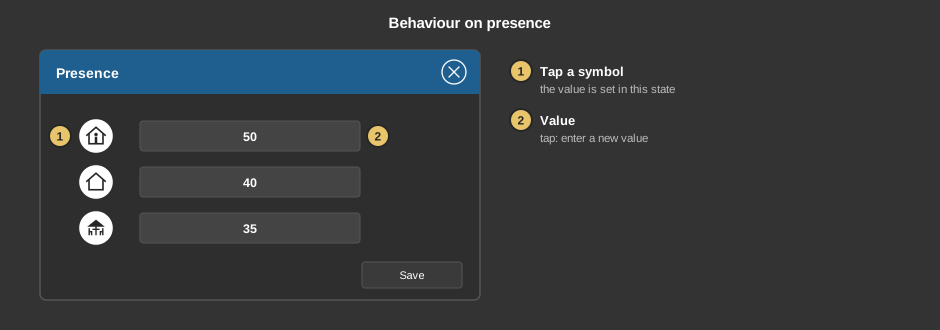
Behind the house you define which setpoint is set when the presence changes. A tap on a symbol selects whether a value is set at all in this state; a tap on the field next to it opens the numeric keypad.
This section is meant for the installer of the system.
The control element comes in two variants:
Converting: In the Studio, an element of the variant Standalone can be converted into the variant Presence with the context menu entry “Convert to presence”. In the list you choose the program page; the function block is created there, its addresses are generated and the addresses of the element are placed on its inputs and outputs. Position, size and settings are kept. There is no way back.
Display |
|
| Scene selection | Defines whether the element can be selected in the control element Block Scene group. Default: on. |
| View | Block (tile) or Basic screen (circle with the setpoint). |
| Text top | Caption in the top row of the tile. |
| Text bottom | Caption at the bottom of the tile. Its size scales with the element, a line break is inserted with \n, at most two lines. |
Display value |
|
| Minimum / Maximum | Range of the ring and the numeric keypad, default 0 to 100. If both are equal, the numeric keypad does not limit the value. |
| Step +/- | + and – change the setpoint by this amount, default 10. |
| Format | Display of the value, e.g. with decimals or a unit, default %d. See Formatting the value display. |
| Factor | Conversion between display and address, together with the offset: value × factor + offset is sent, (value of the address – offset) / factor is shown. This applies to all inputs – ring, + and – as well as the numeric keypad. With factor 10, 450 is shown as 45 and the entry 50 is sent as 500. Default 1. |
| Offset | Is subtracted before display and added to every entry, see factor. Default 0. |
| Zoom text step | Size of the value on the tile in percent, default 80. |
With the variant presence all addresses sit at the function block. With the variant standalone the following are linked at the control element:
| Setpoint | Is sent with every change in the dialog. Its data type also determines how the value is displayed. |
| Set point status | Optional. Feedback of the device, it is shown on the tile and when the dialog opens. Not linked: the value of the address Setpoint applies. |
See also General properties of all control elements.